Words fly away —what is written stays
An app for beauty professionals. Say what happened at the appointment — Scripta sorts out what you said and shows you what it heard before saving. Formulas, preferences, allergies, reminders — all of it stays yours.
Open ScriptaOpens in your browser — nothing to install
Rather ask first? Write to hello@scripta.beauty — a person answers, not a form.
Ready to pay? Subscribe now
How what you say becomes a record
Just talk. Scripta writes it down.
No cards to fill in, no fields to pick, no typing between clients. Say it the way you would tell a colleague: what you did, what you used, what you noticed, what you agreed with the client. Scripta sorts out what you said and builds the record in the client’s card.
1 · You talk
Emma today: roots six zero with three percent, nine thirteen with nine through the lengths, forty minutes.
Asked for a cooler tone and don’t touch the fringe.
Took a home care product, ninety euro altogether.
Root touch-up in six weeks — remind me. And ammonia stings her.
2 · You see what it heard
Numbers stay large and separate. Fix anything right here, before it saves.
3 · Written down. It goes into Emma’s card: formulas, price, preference. The app sets the reminder for 24 August. Six months from now she asks for the same thing — you open her card and read it back.
Watch it work
25 seconds, a real recording of the app. The voice-over is synthesised; captions are on.
Scripta covers four specialties right now
- Hair stylistcolour, cuts, treatments, extensions and hair modification
- Brows & lashesshaping, tinting, lamination, extensions
- PMU artistbrows, lips, lash line
- Manicure, pedicure, extensionscoating, nail art, infills
The app fits prompts, the list of procedures and the dictation examples to your specialty: a colourist never reads about lash lamination, a brow artist never reads about hair colour formulas. Work in more than one? Just pick the ones you need.
Skincare, barbering, makeup, hair removal and massage are in the works. The app starts with the trades that have a recipe, a repeat visit and a cost of being wrong — those are the trades that test speech parsing. Waiting for yours? Write to me and I’ll call you first.
What Scripta gives you
A working app for the professional: clients, visit history, bookings, formulas, notes and everything the work needs, in one place.
Client cards
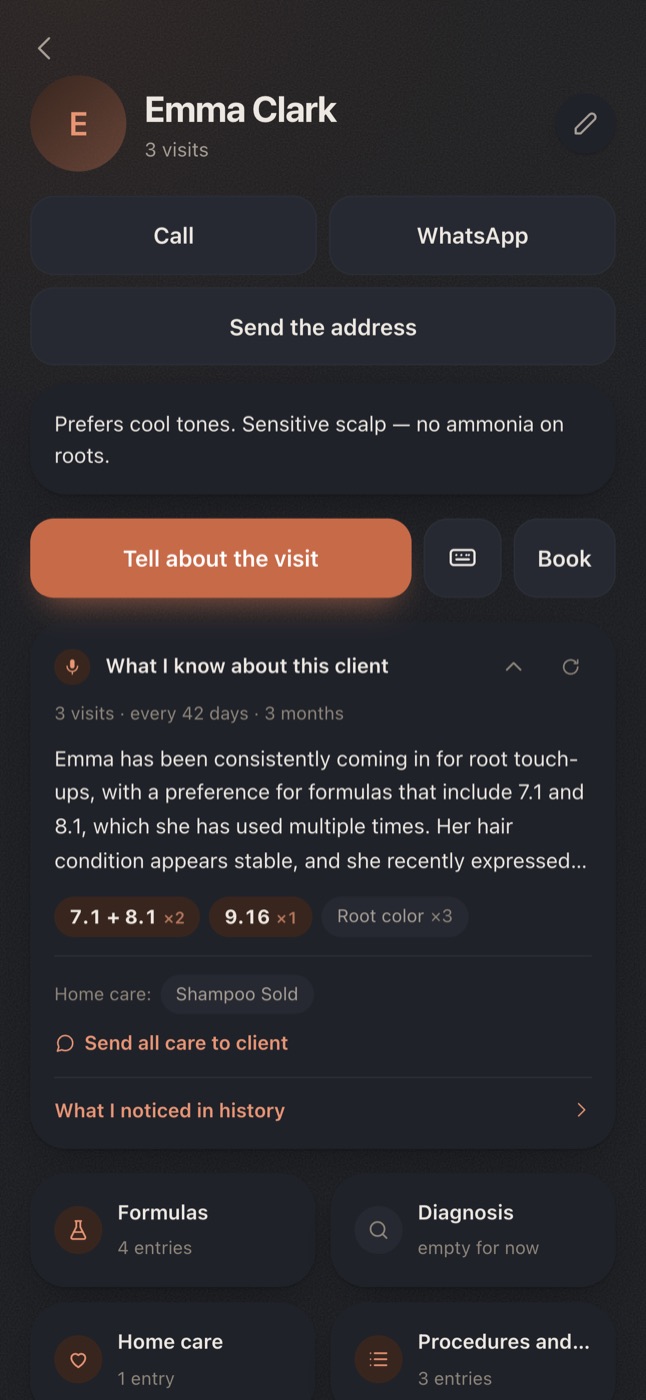
Every client has their own history: visits, procedures, formulas, prices, notes and everything you need to remember. Same names never merge — Scripta lists the namesakes and asks which one you mean, instead of mixing them up.
Calendar and booking
Book on the move, out loud, in your own words: “book Marina for Thursday at 12, colour and a cut”. Scripta creates the appointment and fills in the length of the procedure. Prefer to do it by hand? Add or change anything yourself.
Reminders and birthdays
Say “remind me in three weeks to text Marina” and Scripta creates the reminder. It also shows birthdays coming up, who stopped showing, when the next procedure is due and when home care is about to run out.
Processing timers
Start the timer during the procedure and Scripta tells you when to rinse. It saves the real processing time into the visit history for you.
What matters, in plain sight
Say the skin stung last time and Scripta marks it, showing the warning in the card before you start. Allergies and sensitivities should not get lost among ordinary notes.
Next time you will not have to remember
What you did, what you used, which formula you mixed, what the client asked you to change or repeat — it is already in their visit history, because you told Scripta. You open the card and everything sits where it belongs.
“The same as last time” no longer means “so what did we do last time?”
Formula · July 12
Asked for a cooler tone, fringe left alone. Home care sold. €90
Important
Ammonia stings her. Ammonia-free only.
Your data is yours alone
- Your clients are visible only to you.
- Voice recordings are deleted automatically after a day.
- What is in the client cards is never used for analytics.
- You can save your whole database to a file at any moment.
Questions people ask
Do I have to install anything?
No. Scripta opens in your phone’s browser from a link. You can add it to the home screen — after that it opens like any other app. On Android you can also install it from Google Play; the App Store version comes later.
What if it mishears me?
Before saving, Scripta always shows what it heard and how it read your note. You can check and fix all of it. If the app itself is unsure about a number or a formula, it says so and asks you to confirm.
Words, product names and professional shorthand that Scripta keeps getting wrong go into your own glossary.
A client is right there, speaking feels awkward
You do not have to dictate. Write the same thing as text, freely, in your own words. Scripta reads text the same way it reads a voice note.
Who can see my clients?
Only you. Other people using Scripta have no access to your client list.
The voice recording is used to transcribe the note and to let you listen back, and it is deleted automatically after a day. More about storage and processing is on the privacy page.
Do I need internet?
To transcribe speech, yes. Anything already saved opens without a connection.
Which languages?
The interface is English, Russian, Hebrew, Spanish, Ukrainian and Arabic.
You can dictate in your own language, with your usual accent and your professional shorthand.
Is this a finished app or a test version?
Scripta already works, but we are opening access to the first professionals and continuing to build it with them. The Google Play version is out; the App Store version comes later.
Writing it down is not your job
Scripta is open to its first professionals. Try it in your ordinary working week and tell us what you are missing.
Try ScriptaReady to pay? Subscribe now
Write to us if you would rather ask before signing up.